01

01.jpg

The Center Squares

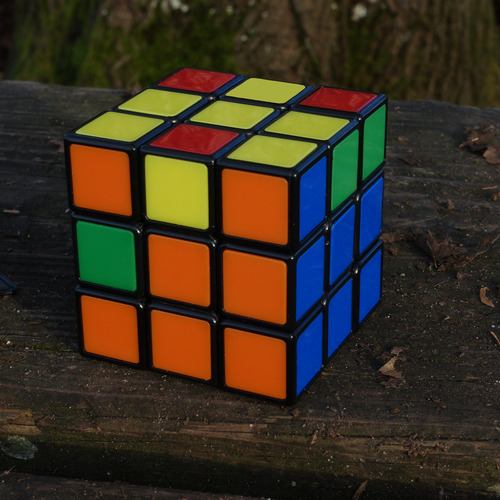
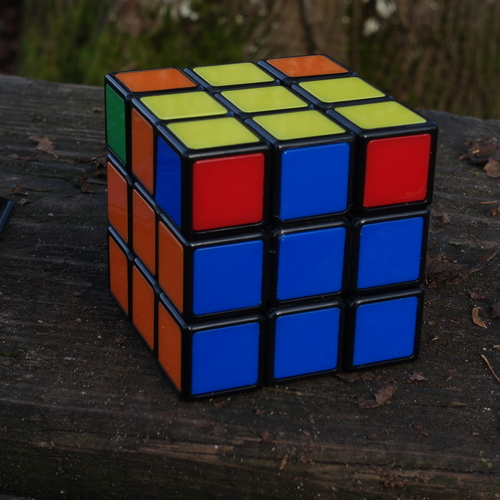
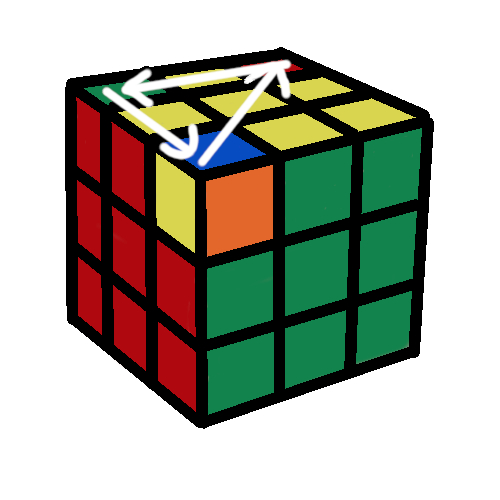
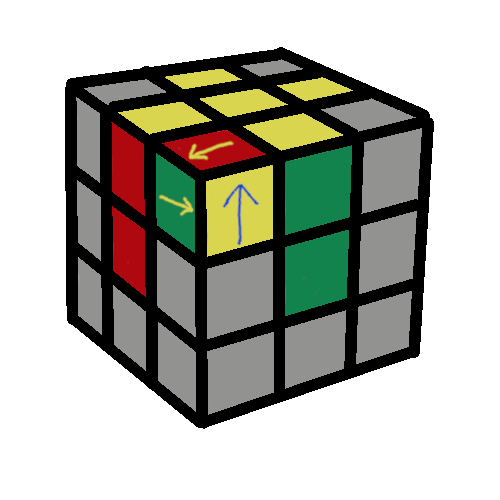
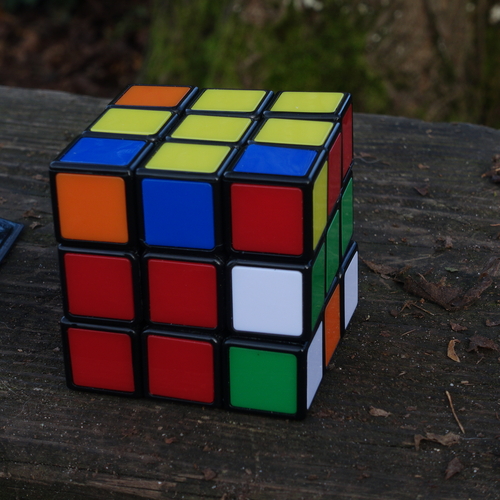
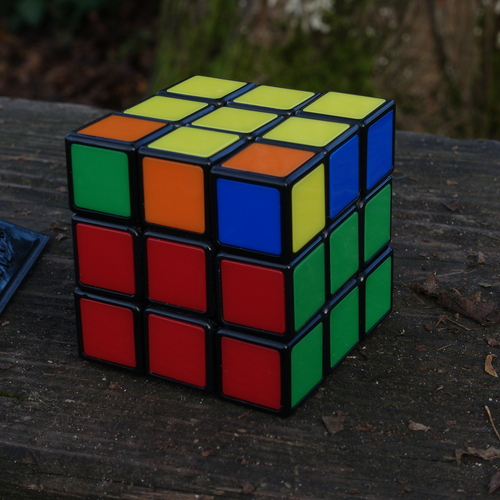
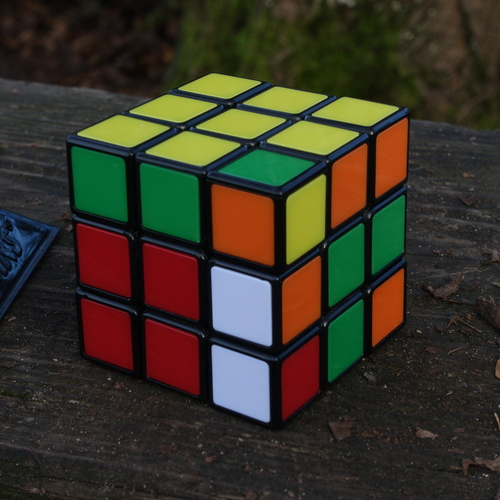
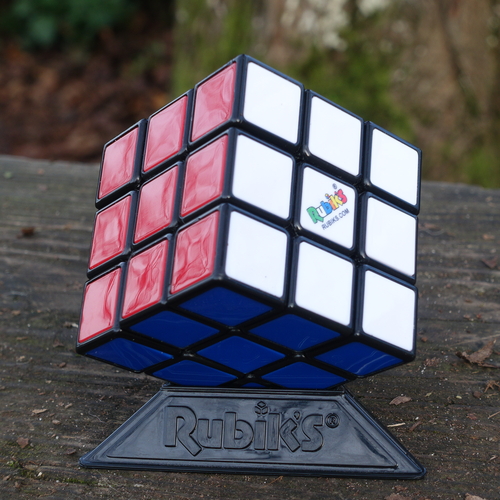
The center squares tell you everything. The center squares are on x-y-z axes. Although you can move all the Rubik's pieces around, every center square will *always* be opposite of another *specific* center square. The white Center will always be opposite of the yellow Center. The red Center will always be opposite of the orange Center. The green Center will always be opposite of the blue Center. This is the key to solving Rubik's Cube. The color of the center squares tell you where to put every other piece.

In the photo above, you can see the red, white, and green Centers. Even without looking, you can be certain that on the opposite side of the red Center, will be the orange Center. Opposite of the white Center will be the yellow Center, and opposite of the green Center will be the blue Center.

02

02.jpg

The First Layer

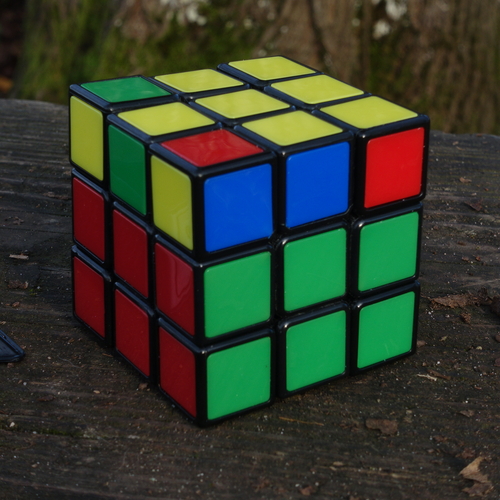
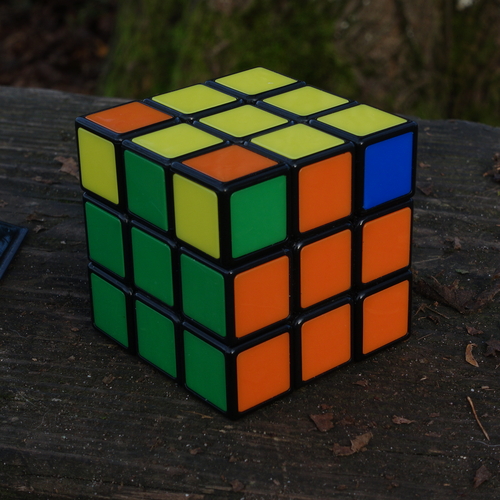
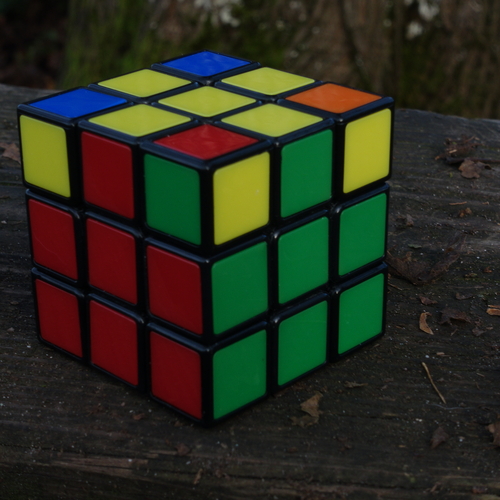
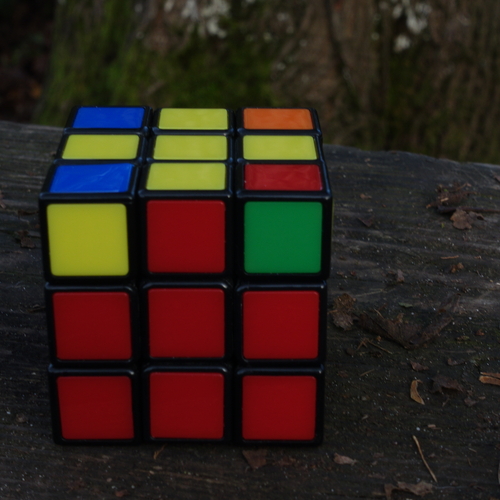
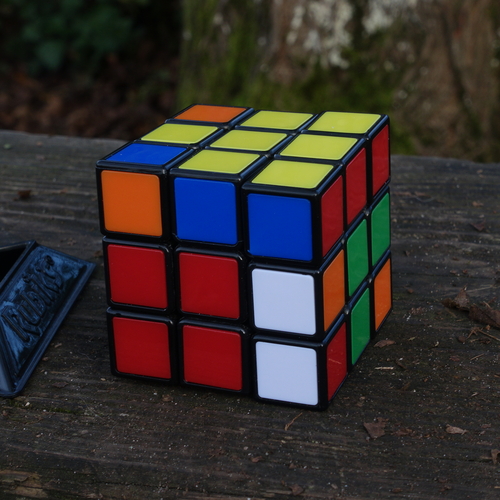
In the photo above, the white-Center side of the Rubik has one piece that is white and red, and another piece that is white and green. These 2-color pieces I will call by the name Edge pieces. I can tell where I want to put every Edge by simply looking at the Centers. The white-green Edge connects the white and green Centers. The white-red edge connects the white and red Centers.

I solve the Cube one layer at a time, and I start with the white side. I would suggest doing the same, at least until you've done it a couple times, simply because these photos will make more sense and be more helpful.

I'm making one big assumption, which is that you will be able to make a white cross, and get all of the corners of your first-layer into their correct "positions". What I mean by this is shown in the photo above, all the pieces surrounding the white Center are in their correct *positions*. In the photo above, the Corner square closest to you is red, white, and green. The Center colors touching this Corner are also red, white, and green. Because the *three* colors of the corner MATCH the *three* colors of the Center Squares the corner is attached to, the red-white-green corner is in the Correct Position. Because the color of each of the corner tiles does NOT MATCH the color of the Center Square it is touching, the corner is not Oriented correctly. The corner needs to be spun to be solved.

If you have difficulty getting the pieces for one layer into the correct positions, I would suggest first learning how to solve a 3x3 8 puzzle. The movements you use to solve the 3x3 8 puzzle are the same type of movements you use to put the Rubic pieces into their correct first-layer positions . One resource for learning how to solve a 3x3 8 puzzle is wikihow. An internet search will give other links which will help you learn this. Here's a link to a digital version of an 8 puzzle, if you want to practice it. Shout out to my cousin Rick, who taught me to do the 8-square at grandma and grandpa's house, when I was maybe 6 years old.

Let me take a moment to explain the layout of the land. I took a scrambled cube, and I took a lot of photos as I solved the cube. I put those photos on this website, and I explained what I was doing as I solved that cube. My explanation took the form of If-Then statements. If this happens, do this. After finishing this, though, I realized there were parts of that explanation that I could've made shorter. There was a whole other teaching style, where I could say, "These are the things that might happen, these are the tools you use in each situation, now figure out how to solve the problems."

So I decided to do both. If you read straight down this page, it will be like you are looking over my shoulder as I solved the cube. You should be able to use my methods to solve your own cube. My main idea of this website is that if you are not allergic to memorization, or even following directions, then the cube is fairly easy for most people to solve.

What I've added, though, is an alternate learning path, where I try to be less verbose and try to let you learn with a more Self-Directed method. I'm still using most of the same photos, and I'm still giving you the same tools, but I'm not explaining everything with as much detail. For example, this whole explanation about these two paths will *not* be in the other path. The cube is still a subject with a certain amount of complexity, though, so there is still a lot to read, but the other path is more succinct. I would think this longer, more detailed section, would be more effective for your first solve, but it is up to you.

This page has 6 drop-down sections, and 2 of those sections were already pretty compact, so those 2 drop-down sections have remained virtually the same. The other 4 drop-down sections have two different versions. Each point where the versions diverge has a link like the one below, which allows you to switch back and forth. Note that the background on the page you are on is black. The background on the other path is a very dark blue-black. It depends on your screen quality and your screen brightness, but you might not be able to tell the difference. What is more obvious is the rectangular border around the links. When you are on the longer, If-Branch path of the page, the rectangle below will be the color Silver. When you are on the shorter, Self-Directed path of the page, the rectangle below will be the color Teal. You don't need to memorize these colors, because the text inside the colored rectangles will explain where you are and where you could go. You can always go back and forth between the two versions by hitting the links inside the colored boxes.

"Two roads diverged in a yellow wood," as Robert Frost wrote. If you want all the details of my If-Branch explanation, continue reading below. If you want a shorter version, which summarizes a more Self-Directed learning method, go here.

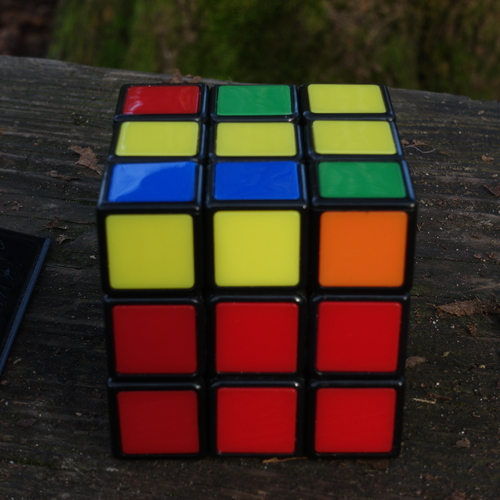
When solving the first layer, I find it easier to first put the Edge pieces in position to make a "cross". You can see this with the white Edges in photo 2. When putting these *Edges* on the first layer, make sure the colors are oriented correctly. This is also shown in photo 2, with the white/green Edge oriented so that the colors of the Edge match the colors of the center squares they are next to. Same thing with the white/red Edge in photo 2.

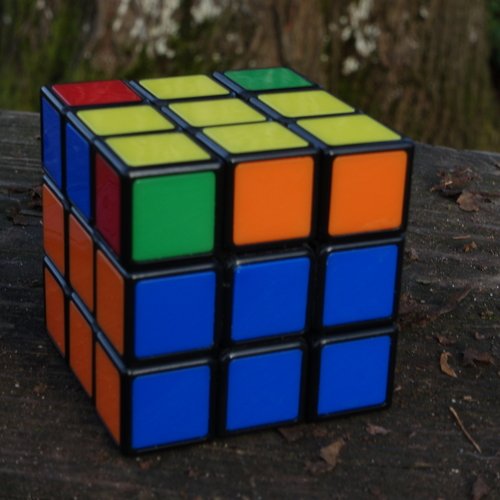
When solving the first layer, I then put the Corners into their correct "position". If they go to their position with the correct "orientation", that is fine, but it is not necessary. In photo two, the red-green-white Corner colors do not match the Center colors they are touching. Correcting the orientation is easy to do, with the following algorithm.

Special Announcement!!! All of the algorithms below will begin with a specific orientation. Part of that orientation will always be that you are holding the cube so that a specific Center square is facing you, as you begin the algorithm. For every algorithm, KEEP THAT SPECIFIC *Center square* facing you until you finish ALL the turns of the algorithm!!!

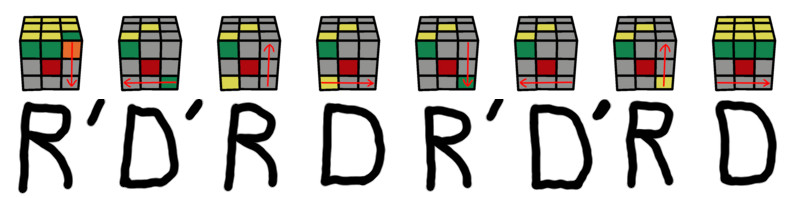
The first algorithm to learn is the Corner-spinning algorithm. With the Corner-spinning algorithm, I can put the corners of the first-layer into their correct positions, and then spin the Corners to solve the first-layer.

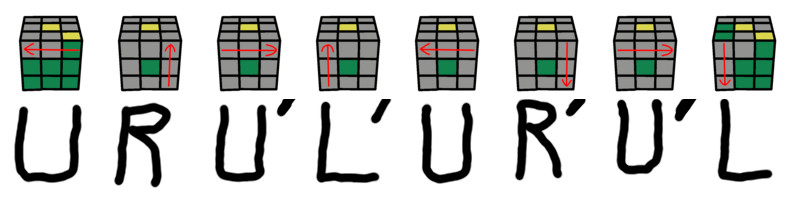
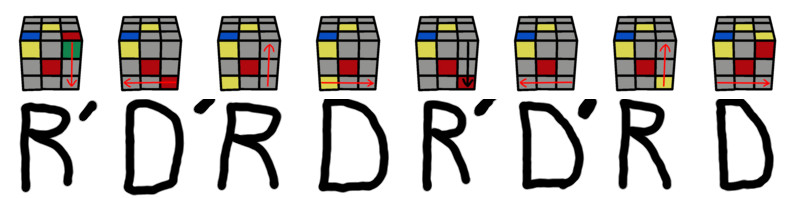
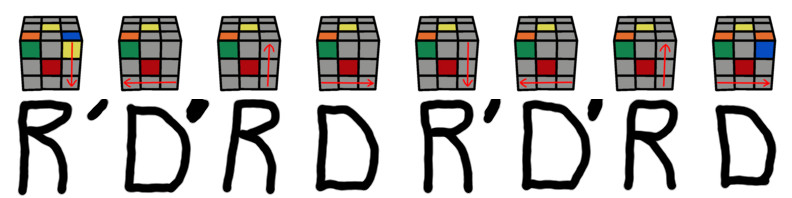
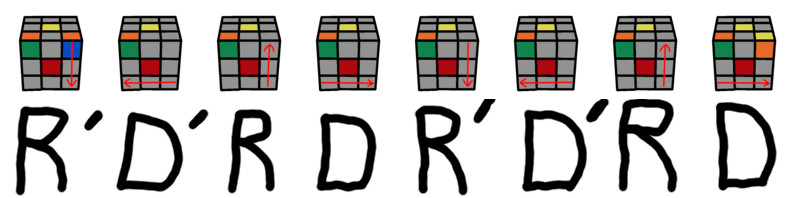
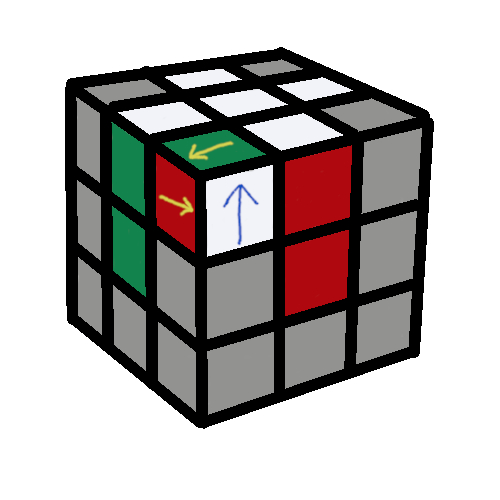
If I start with the green Center facing me, and the white Center facing up, this algorithm will spin the top-right corner of the front side, as illustrated in the picture below.
spinCorner.jpg

NOTE: If I start with the green Center facing me, and the white Center facing up, this algorithm moves the white tile on the right side, to the upper side. But what if I want to move the tile on the front side, to the upper side? In the diagram above, what if I wanted to move the red tile from the front side of the cube, to the upper side of the cube? This algorithm works for that also. I would peform the algorithm to move the red tile from the front side, to the right side. Then, I would simply perform the algorithm *again*, to move the red tile from the right side, to the upper side.

To spin the white-red-green Corner in photo two, above, I turn the whole Cube so that the green Center is facing me, and the white Center is on top. In other words, turn the whole Cube, so the white-red-green Corner is in the top-right of the green side. To use the algorithm below, I keep the green Center facing me, and rotate the side that is indicated by the algorithm.

Technically, each piece can be moved horizontally or vertically. This can make the arrows in the diagrams confusing. If you over-think this, the arrows can become like a Rubin's vase. This is not what you want. You want to know exactly what the arrows mean, without thinking about it.

One trick which helps you rotate the correct pieces: for each move of an algorithm, move your fingertips, *or* thumb, over the squares that are covered by the arrow in the move's diagram. With your fingertips, *or* thumb, over the squares that are covered by the algorithm arrow, your hand will naturally rotate the correct pieces.

For each move of each algorithm, I rotate one side 90 degrees. 1/4 of a full circle. There is one exception, and that will be explained in detail when we get to the section Transpose Yellow-Cross Edges.

R = Right
- rotate the Right three pieces of the Front side.
D = Down
- rotate the Bottom three pieces of the Front side.

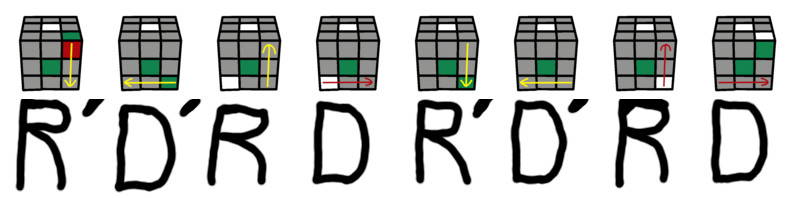
Which direction do I rotate the pieces? If there is *NOT* an apostrophe after the letter, I rotate the side CLOCKWISE. If there *IS* an apostrophe after the letter, I rotate the side COUNTER-Clockwise. I define clockwise or counter-clockwise by imagining that I am looking straight at the side I am rotating. For example, R' means I rotate the Right side of the Cube COUNTER-Clockwise. I want to continue holding the Cube so that the green Center is facing me, and the white Center is on top. Because I'm rotating the *right* side, I will define Counter-clockwise *as if* I was looking at the Cube *from the right side*, directly at the red Center. This is shown in the first turn of the diagram below.
02_algorithm.jpg

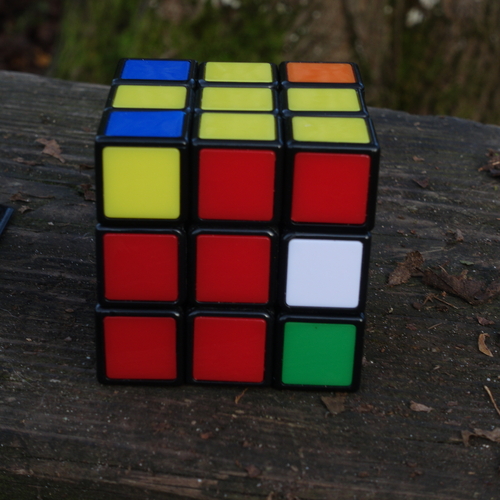
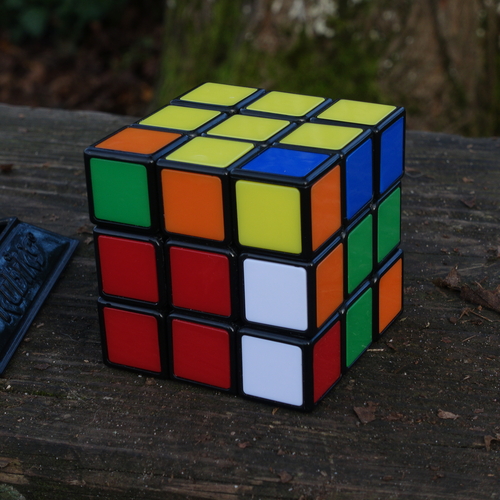
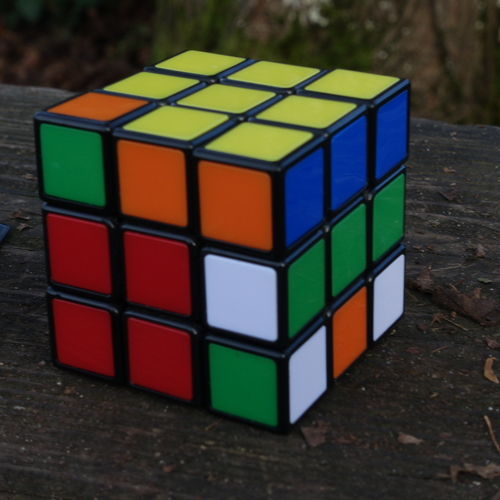
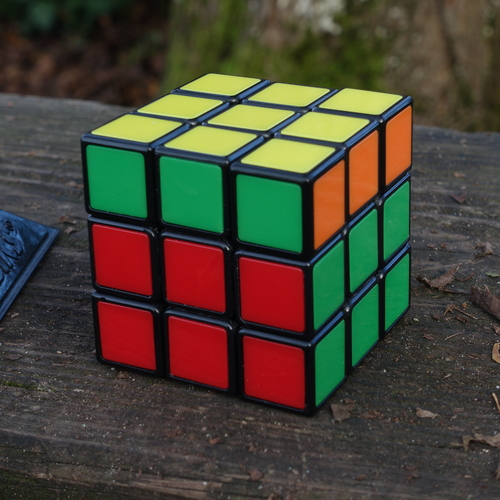
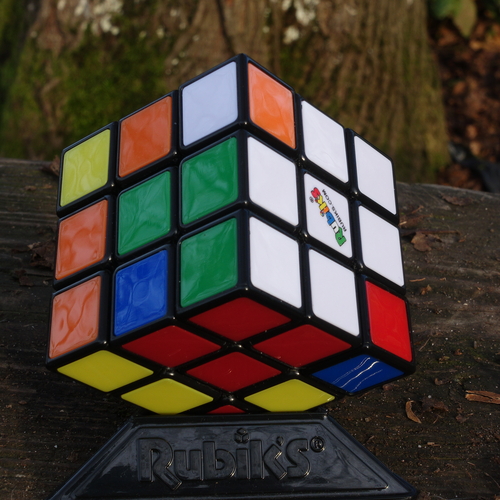
This algorithm changed the Cube from photo 2, to photo 03 below. This algorithm solved the red-white-green corner.

03
03.jpg

When I used the algorithm to spin the red-white-green Corner, I was looking at the green center, and the white center was on top. I want to *CONTINUE HOLDING THE CUBE LOOKING AT THE GREEN CENTER, WITH THE WHITE CENTER ON TOP*, for the rest of these steps, until the White-layer is solved.

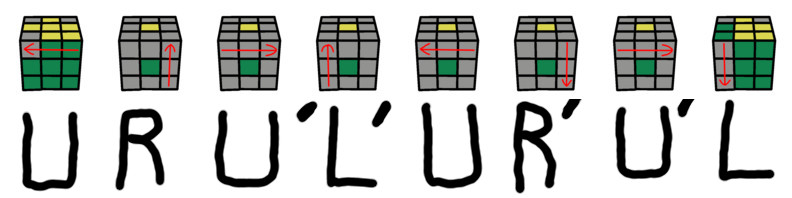
I want to now use the algorithm to spin the white-orange-green Corner, so I rotate the (white) upper-layer to put the white-orange-green Corner in the top right. I want to keep looking at the green center, and the Corner that I want to spin should be in the top-right. I then use the same algorithm to spin the white-orange-green Corner.
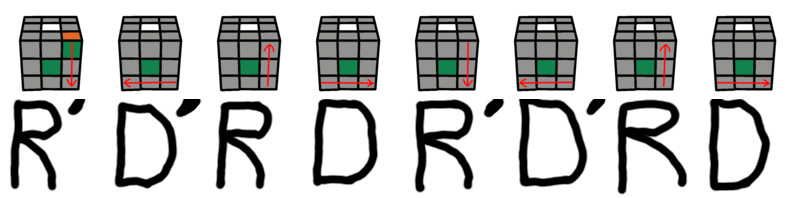
03_algorithm.jpg

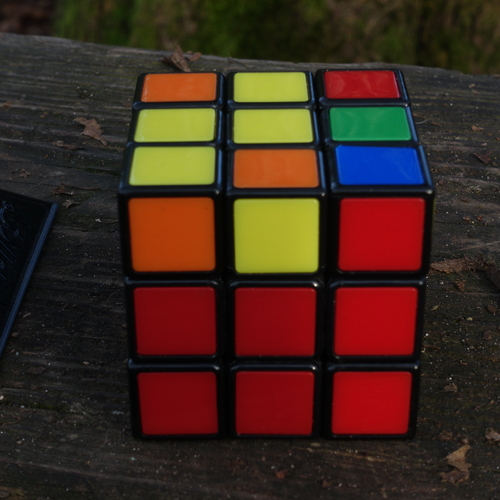
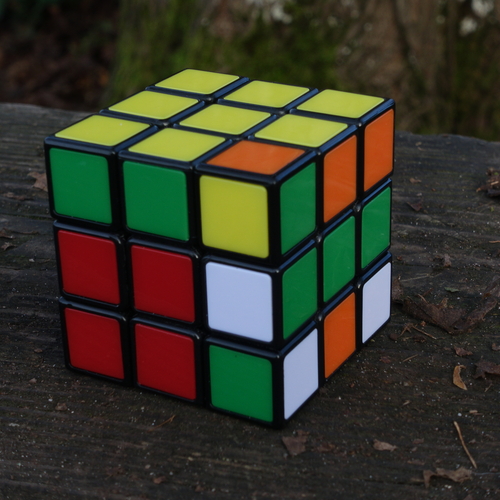
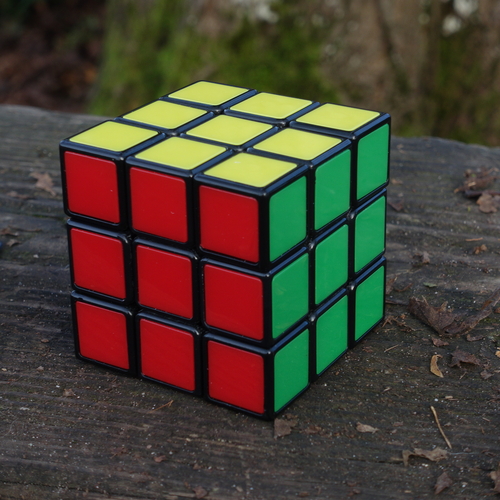
Photo 04, below, shows that the white-green-orange Corner has been spun to its correct position. Only one more Corner needs to be spun before the white-layer will be solved.

04
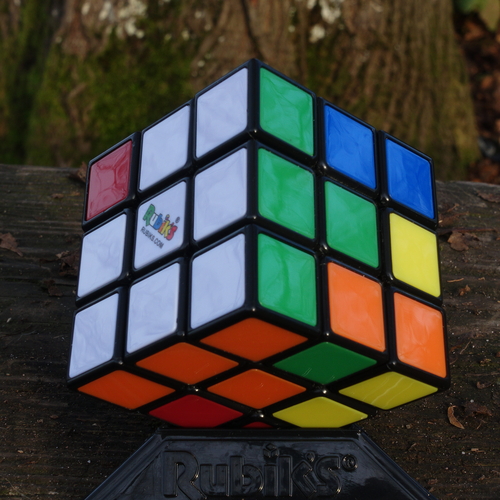
04.jpg

Now I change the red-white-blue Corner in the same way. Continuing to look at the green Center, and keeping the white Center on top, I rotate the upper-layer until the red-white-blue Corner is in the top right. I then use the same algorithm to spin the red-white-blue Corner.
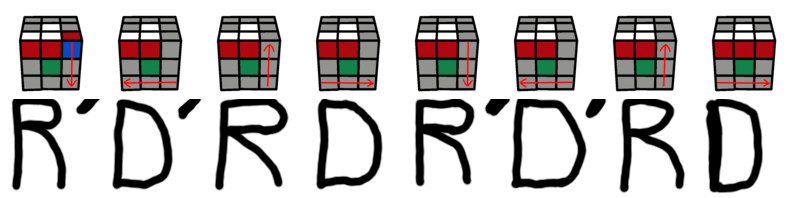
04_algorithm.jpg

The algorithm spun the white-red-blue corner.

I rotate the top layer so that the center squares of the middle layer match the colors of the top layer, and the white-layer is solved, as shown in photo 05 below.

Join The Club: When speaking the above algorithm, most people will begin with "R-prime, D-prime." Prime is only one syllable, so it is much easier to say (or even think) than "apostrophe".

05

05.jpg

!!!Pro Tip!!!: When I solve this first-layer, I usually *try* to use the algorithm above *at least* once. To use the algorithm above for the first-layer, I don't *need* to keep the green center facing me. However, keeping the green center facing me, *allows* the pieces in the lower-layers to return to their original position, at the end of the algorithm. This is not necessary while solving this first-layer. Returning the pieces in the lower-layer to their original position, however, is *required* when using this algorithm to complete the last step, and solve the whole Cube. Basically, in this first step, I want to practice this algorithm exactly the way I will use it in the last step. If I make a mistake with how I use this algorithm while completing the *last step*, then I will probably have to come all the way back to this first step, and start over.

TURN THE WHITE SIDE SO IT FACES DOWN. THE BOTTOM LAYER IS SOLVED, WITH EVERY PIECE MATCHING ITS CENTER-SQUARE COLOR.
06

06.jpg

The Middle Layer

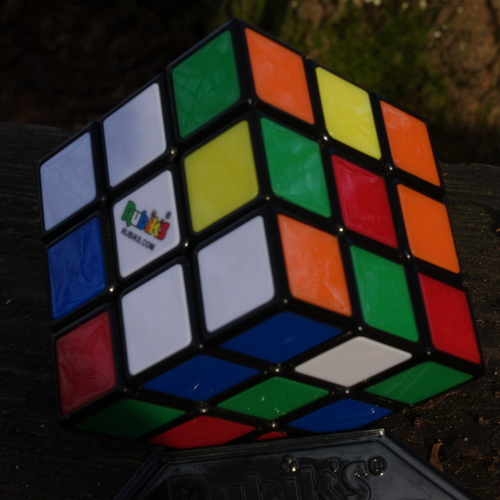
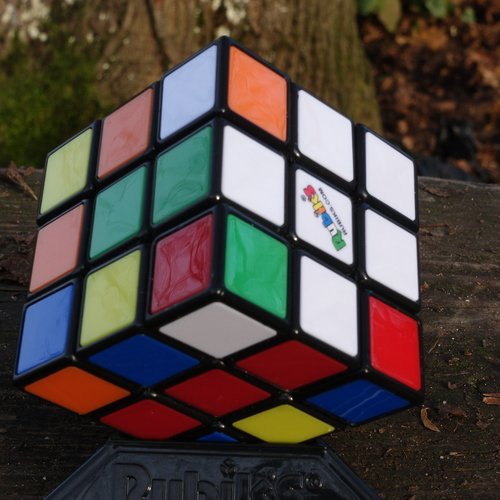
Now that the white-layer is solved, turn the whole cube upside-down, so that the white-layer is down. The next step is to solve the middle-layer. Remember, the Center squares tell us where to place all the other pieces. In photo 06 above, we want to move the orange-blue Edge from the upper-layer, so that it will connect the orange and blue Centers. Hold the Cube so that you're looking at the orange Center, with the yellow Center on top, and use the algorithm below to move the orange-blue Edge to the *right*.

U = Up
- rotate the Top three pieces on the Front side.
R = Right
- rotate the Right three pieces of the Front side.
F = Front
- rotate all the pieces of the Front side.
06_algorithm.jpg

The magic of this algorithm is that it moves the orange-blue edge where it belongs, but it *also* keeps the bottom-layer solved.

07

07.jpg

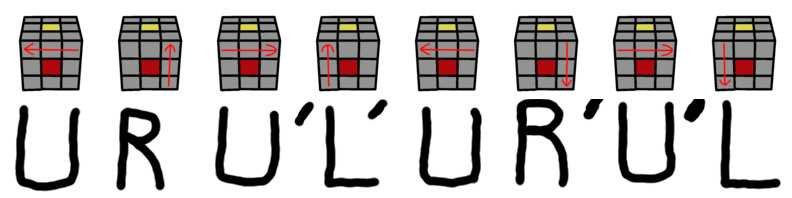
But what if we want to move the green-red Edge to the *left*, like in photo 07 above? We hold the Cube so that we're looking at the green Center, with the yellow Center on top, and use the algorithm below to move the green-red Edge to the *left*.

U = Up
- rotate the Top three pieces on the Front side.
L = Left
- rotate the Left three pieces of the Front side.
F = Front
- rotate all the pieces of the Front side.
07_algorithm.jpg

Again, the magic of this algorithm is that it keeps the bottom-layer solved.

We only need these two algorithms to solve the middle-layer. We match a middle-layer Center color with a upper-layer Edge color. Then we use an algorithm to move the Edge piece, so that the other (top) color of the Edge piece will match the Center square on the left side or the right side.

08

08.jpg

What if we've moved all the non-yellow Edge pieces from the upper-layer, and there are Edge pieces in the middle-layer that are in the WRONG position? What do we do with the middle-layer green Edge in photo 08 above? The solution is to use one of the two algorithms above, to move a yellow-colored Edge piece from the upper-layer, to the position of the green Edge in the middle-layer. This will *also* move that middle-layer green Edge to the upper-layer. From photo 08 above, we use the move-left algorithm to move the red-yellow Edge to the middle-layer green Edge. We do this to move the green Edge to the upper-layer.

After the green Edge is moved to the upper-layer, we use one of the two algorithms above, in the same way as before, to move the green Edge from the upper-layer, to its correct position in the middle-layer. This will solve both the bottom layer and the middle layer, as shown in photo 09 below.

09

09.jpg

THE BOTTOM TWO LAYERS ARE SOLVED, WITH EVERY PIECE MATCHING ITS CENTER-SQUARE COLOR.
10

10.jpg

Yellow-Cross On Top

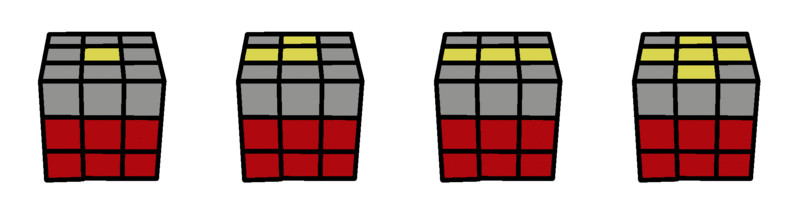
The next step towards solving the Cube is to make a yellow-cross on the upper-layer. By "yellow-cross on the upper-layer", what I mean is that the yellow Center square is on top, and all four of the Edge pieces have yellow facing up.

For this complete drop-down section, IGNORE all four upper-layer Corners.

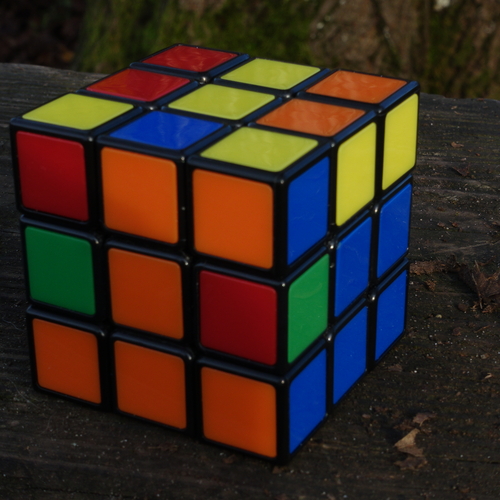
>>>Sometimes, when you finish solving the bottom and middle layer, the Cube will have a yellow-cross on the upper-layer, like shown in photo 10 above. Don't worry if the upper-layer Edge colors don't match the Centers of the middle-layer, we'll fix those in the next section, after photo 14. If your Cube already has a yellow-cross on top, skip this section, and JUMP to the instructions under photo 14, Transpose Yellow-Cross Edges. Note that photo 10 and photo 14 are the same picture. Sometimes you will arrive at this step and the Yellow-Cross will already be on the Top layer, but mostly you have to work to put it there.

What you will do now is use one algorithm to change the pattern of the upper-layer from "Yellow-Center-Only", to "Yellow NorthWest", to "Yellow Horizontal Line" to "Yellow-Cross". You want the upper-layer to be a "Yellow-Cross", and how many times you need to use this algorithm is determined by the (random) starting-state of the upper-layer.

crossOverview.jpg

Above is the graphical overview of the way this algorithm moves the upper-layer to a Yellow-Cross. How many times you must perform this algorithm is randomly determined by the state the Cube is in when you get to this step.

Pretty rarely, when I'm solving the cube, it doesn't move directly from one of the above pictures, to the next. I've always assumed this was because I had made a mistake, but teaching is one way to learn. While writing this page, I've been questioning this, and now I'm paying more attention to it. I hope to update this soon. Whether this has been my mistake, or it has been caused by a state of the cube, I have to think it will happen occasionally to you. Don't worry about this, because it has never really been a problem with me. I've never paid it much attention in the past, because I simply repeat the steps here with this algorithm, and the cube will fall back into this sequence of progression towards the Yellow-Cross On Top.

You now have a choice. If you want all the details of my If-Branch explanation, continue reading below. If you want a shorter version, which summarizes a more Self-Directed learning method, go here.

11

11.jpg

Until now, we've been moving straight down the page. For photo 11, and the next two photos, though, our goal is to move backwards. We want to move the Cube to the "Yellow-Cross On Top" in photo 10, and then jump to photo 14. This is slightly more complicated, but the easy part is that we only need one algorithm to get us to photo 10. Once we have the Yellow-Cross On Top as shown in photo 10, we jump to photo 14.

>>>After you solved the bottom-two layers, did the upper-layer of the Cube have a Yellow *vertical*, or Yellow *horizontal* line through the yellow center square? Remember, we are ignoring the Corner pieces, so we are also ignoring yellow *diagonal* lines through the yellow center square.

If there is *not* a Yellow vertical or Yellow horizontal line through the yellow center square, go straight to the instructions under the next picture, photo 12.

If you have a Yellow line that is *vertical*, turn the Whole Cube so that the line becomes *horizontal* as shown in photo 11 above, and the diagram below.

With the red center facing us, and the yellow center on top, we perform the algorithm below, to change the Yellow Horizontal Line to a Yellow-Cross On Top. The red color is random. The center square facing you might be red, orange, blue, or green. What is important is starting with the Horizontal Line of Yellow Squares on the Top Layer. What is also important is, *whatever color* the center square facing you is, that color must remain facing you from the beginning to the end of an algorithm.

11_algorithm.jpg

As long as you turn this algorithm correctly, the bottom-two layers will remain solved.

Once you have the Yellow-Cross On Top, and the bottom-two layers are solved, as shown in photo 10, then jump ahead to photo 14.

12

12.jpg

You are here because you solved the bottom two layers, but there was *not* a yellow-cross on the upper-layer, AND the upper-layer did *not* have a Yellow vertical or Yellow horizontal line.

>>>Are two of the Top-Edges yellow?

If you do *not* have two yellow Top-Edges, skip down to the instructions under photo 13.

With two yellow Top-Edges, turn the WHOLE Cube clockwise or counterclockwise to orient the yellow Center and yellow Edges as shown above, in photo 12.

I'm calling photo 12 the "NorthWest Orientation". The yellow-Center and yellow-Edges are like the North and West pointers on a compass. With the yellow-Center up; with the yellow-Edges placed in the same orientation as photo 12, use the algorithm below to give the upper-layer a straight yellow line.

The red color is random. The center square facing you might be red, orange, blue, or green. What is important is starting with the "Northwest Orientation" of Yellow Squares on the Top Layer. What is also important is, *whatever color* the center square facing you is, that color must remain facing you from the beginning to the end of an algorithm.

12_algorithm.jpg

Now that the upper-layer has a straight yellow line, go to the instructions below photo 11, as you work your way back to photo 10, so that you can jump to photo 14.

13

13.jpg

You are here because you solved the bottom two layers, but there was *not* a Yellow-Cross on the upper-layer, AND the upper-layer did *not* have a Yellow vertical or Yellow horizontal line. ALSO, there are *not* two Top-Edges that are yellow.

Put the yellow Center facing up, and pick a Center square to focus on while you perform the algorithm below. Keep that Center square facing you. In photo 13, I've chosen the red Center square, and I will keep that square facing me, while I perform the algorithm below.

13_algorithm.jpg

After this algorithm, with the yellow center-square facing up, you may have to turn the *Whole Cube* clockwise or counter-clockwise, to get the yellow edges to point "north" and "west". Now that the upper-layer has the yellow "NorthWest Orientation", go to the instructions below photo 12. Those will show you how to change the upper-layer to a straight yellow line, and then send you to the instructions below photo 11. You will work your way back to photo 10, so that you can jump to photo 14.

14

14.jpg

Transpose Yellow-Cross Edges

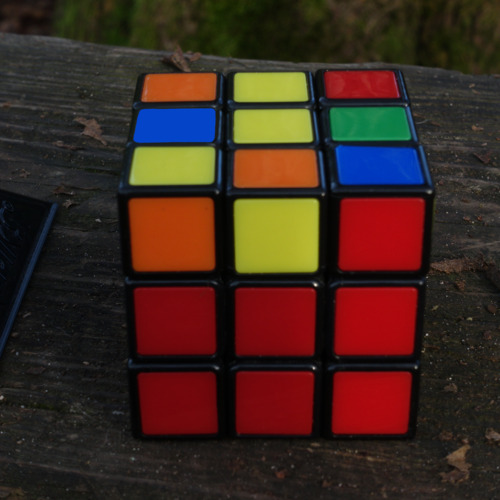
In the photo above, the bottom two layers are solved, and there is a Yellow-Cross on the upper-layer. Sometimes when you make the Yellow-Cross on the upper-layer, all four of the Yellow Edge-pieces will match the color of the Center squares. If that happens, go straight to the instructions under photo 16.

Sometimes when you make the Yellow-Cross on the upper-layer, all four of the Yellow Edge-pieces will match the color of the Center squares *if* you simply hold the Cube with the Yellow-Cross on the upper-layer, and rotate the upper-layer 90 degrees, or 180 degrees, or 270 degrees. If you can rotate the upper-layer to match all four of the Yellow Edge-pieces to the Center squares, do that, and go straight to the instructions under photo 16.

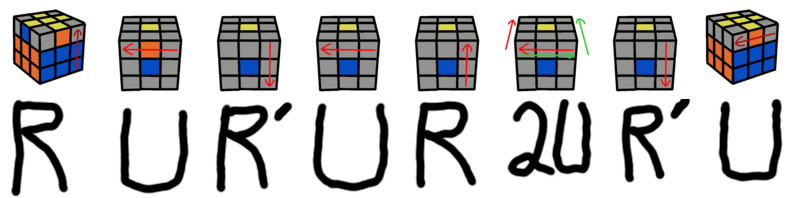
If you can't get the Edges of the upper-layer to match the color of the Center squares, then rotate the top layer until two of the Edges of the upper-layer *WILL* match the color of the Center squares *IF* you *SWITCH* the Top-Front Edge with the Top-Left Edge. Photo 14 above is an example of this. IF you SWITCH the orange and the blue edges in the top layer, then they will match the Center squares. The algorithm below will do that.

Notice that the algorithm below does something that we haven't done before. The algorithm below includes "2U". This means we are rotating the Upper-layer *twice*. In other words, we are rotating the Upper-layer 180 degrees. 2U rotations are easier, because it doesn't matter *which direction* we make the rotation. If we rotate the Upper-layer 180 degrees in *either* direction, we will get where we want to go. The diagram below illustrates this, with both a green double-arrow, and a red double-arrow. This shows that we can rotate the top layer in *either* direction. (*not* both directions.)

14_algorithm.jpg

15

15.jpg

Photo 15 shows the results of the algorithm above. The orange-yellow and blue-yellow Edges have been switched, and they are now in their correct positions. Note again, the algorithm doesn't mess up the bottom two layers, and they are still solved.

What about the other two Edges of the upper-layer? If they are *not* in their correct positions, we place them in the same orientation. We turn the *Whole* Cube so one of the incorrect Top-Edges faces us, and the other incorrect Top-Edge is on the left side. Then we do the same algorithm, to transpose them to their correct positions.

One thing I want to point out with photo 15. Notice how the left side looks maybe orange or maybe red. All cats are gray in the dark. When solving the Cube, it helps to do it in bright light, so that it is easier to differentiate between the colors at a glance.

THE BOTTOM TWO LAYERS ARE SOLVED, WITH EVERY PIECE MATCHING ITS CENTER-SQUARE COLOR. THE TOP LAYER HAS A YELLOW-CROSS, AND BOTH COLORS ON EACH YELLOW EDGE-PIECE MATCH THEIR CENTER SQUARES.
16

16.jpg

Reposition Top Yellow Corners

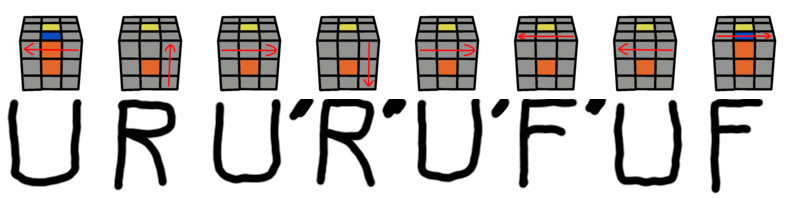
You will use the algorithm below, 0-3 times, before you can move to Photo 17. How many times you use the algorithm is determined by the (random) state of your Cube when you arrive at Photo 16. Most of the time, you will use this algorithm one or two times.

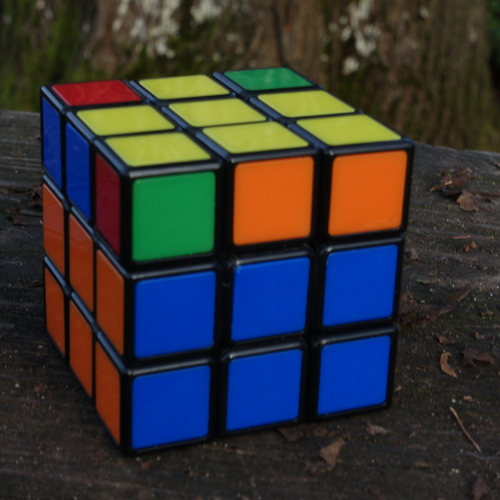
Now that the Yellow-Cross on the Upper-Layer is solved, look at the Upper Corners to see if they are in their Correct Positions. Remember, by "Correct Positions", I don't mean that they are solved, but that the *three* colors of the Corner-Piece are the same *three* colors of the Center-Squares that are next to the Corner-Piece. For example, in photo 16, the green-orange-yellow Corner is in the Correct Position, even though the green-orange-yellow Corner is not solved. This is what we are looking for in this section. We won't need to *solve* the Upper-Corners until the next section.

Having said that, though, *if* one of the Upper-Corners is *solved*, then it will *ALSO* be in the "Correct Position".

>>>Are *all 4* Upper-corners in their Correct Positions? If *all 4* Upper-corners are in their Correct Positions, go directly to the instructions under photo 17.

You now have a choice. If you want all the details of my If-Branch explanation, continue reading below. If you want a shorter version, which summarizes a more Self-Directed learning method, go here.

>>>If your Cube has *NONE* of the Upper-Corners in their Correct Position, then keep the yellow Center-Square facing up, and look at one of the center squares, while you perform the algorithm below. It doesn't matter which color Center-Square faces you, *AS LONG AS* you keep the *SAME* Center-Square facing you throughout the algorithm, and keep the yellow Center-Square facing up. This algorithm will put one of the Upper-Corners into its Correct Position, which allows you to continue with the instructions below.

16a_algorithm.jpg

To perform this algorithm on photo 16, I held the Cube so that the yellow Center-Square faced up. Because the Cube had only one Upper-Corner which was in its Correct Position, I turned the *Whole Cube* so that Upper-Corner was in the top-right of the green-centered side that faced me. From photo 16, I held the cube so the green-orange-yellow Corner was in the top right.

At the end of this algorithm, the top-right Corner will be in the same position, but the other three Upper-Corners will switch positions in the upper layer, in a counterclockwise direction. In other words, at the completion of the algorithm, the top right Corner in the green Front side of the cube will remain in the same position, but the other three corners in the Upper Layer will move in the direction of a U' rotation. You could say that the other three corners are the points in a triangle, and they move in a counterclockwise circle, each time this algorithm is completed.

repositionTriangle.jpg

With the yellow Center-Square facing up, I am looking at the green Center-Square and putting the green-orange-yellow corner in the top right. I'm doing this because, at the end of the algorithm, the top-right corner will return to the same position. I'm also doing this because, in photo 16, the green-orange-yellow corner is already in its correct position. To make these diagrams more clear, I'm going to *hypothetically* spin the top-right corner from photo 16. This will allow these diagrams to start with the top-right corner in the solved position, so they will be easier to understand.

I will hold the Yellow Center-Square facing up. I will note the color of the Center-Square of the Front side. I will keep that Center-Square facing me, and the Yellow Center-Square facing up, as I perform this algorithm.

16b_algorithm.jpg

>>>Are all four of the Upper-layer Corners now in their *correct positions*? If so, go to the directions under photo 17.

If all four of the Upper-layer Corners are *not* in their correct positions, I will perform the same algorithm again. With the Yellow Center-Square facing up, I will turn the Whole Cube to move the Upper-Layer Corner which is in its Correct Position, so that it is in the top right of the Front side. I will note the color of the Center-Square of the Front side. I will keep that Center-Square facing me, and the Yellow Center-Square facing up, as I perform the algorithm for what should be the last time.

16c_algorithm.jpg

>>>All four of the Upper-layer Corners should now be in their correct positions. Sometimes, although it is rare, putting the four Upper-layer Corners into their correct positions, will also solve each of those Corners. If that happened, the Cube is solved!

>>>If the four Upper-layer Corners are in their correct positions, but all of those corners are *not* solved, move forward to the directions under photo 17.

>>>If the Cube does *NOT* have the bottom two layers solved, with a yellow cross on top, and every Upper-layer Corner in its *correct position*, you've made a mistake somewhere along the way. You will need to move backward to find the instructions for the state your Cube is in. This might mean you have to go back to Photo 1, but maybe you only have to continue from a previous algorithm - it depends on the state of your Cube.

THE BOTTOM TWO LAYERS ARE SOLVED, WITH EVERY PIECE MATCHING ITS CENTER-SQUARE COLOR. THE TOP LAYER HAS A YELLOW-CROSS, AND BOTH COLORS ON EACH YELLOW EDGE-PIECE MATCH THEIR CENTER SQUARES. EACH OF THE YELLOW CORNERS IS IN ITS CORRECT POSITION.
17

17.jpg

Spin the Top Yellow Corners

You now have the Cube solved, except for one or more Corners in the Upper-Layer which need to be spun. So far, we've been able to see the progress being made with every step. First, we saw the bottom-layer solved. Then, we saw the middle-layer solved. Next, we placed the Yellow Cross on the upper layer, and moved the Upper-Layer Corners into their correct positions.

We are now very close to completely solving the Cube, but in this last step, the colors are going to explode in every direction. The cube will appear to be completely messed up, but then, suddenly, it will be completely solved. You have to focus on correcting one Upper-Corner at a time, and remember that the algorithm will solve the rest of the pieces.

In order to help keep this focus, always keep the Yellow Center-Square facing up.

Also, pick one Upper-Corner that you want to spin first, and turn the *Whole Cube* so that corner is in the top-right of the side facing you. With that corner in the top-right, what is the color of the Center-Square of the Front side? Remember the color of that Center-Square. That Center-Square should continue facing you for the rest of the directions.

And don't forget, in addition to keeping that Front Center-Square facing you, for the rest of the directions, *also* keep the Upper Yellow Center-Square facing up.

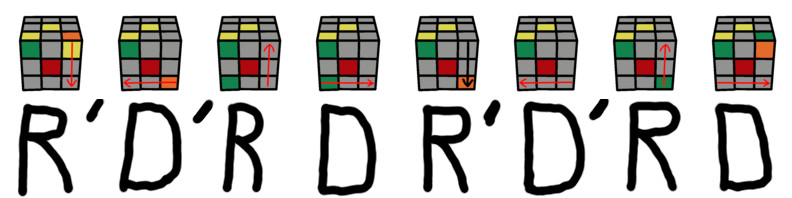
If you do those two things, the only other thing needed, is to repeat the algorithm that you may have practiced in the very first step, when we were solving the first Layer.

You now have a choice. If you want all the details of my If-Branch explanation, continue reading below. If you want a shorter version, which summarizes a more Self-Directed learning method, go here.

A similar diagram was shown in The First Layer drop-down section. If I perform the algorithm in this section, with the red center facing me, and the yellow center facing up, I will spin the top-right corner in the direction shown in this picture.

spinCornerYellow.jpg

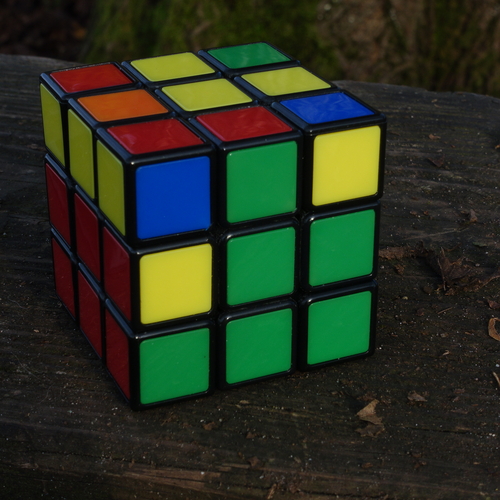
I will walk you through these procedures, starting with the Cube in shown in Photo 17. The first Upper-Corner that I'm going to solve is the red-green-yellow corner which is nearest the viewer.

18

18.jpg

Notice that in every photo until this Cube is solved, the Red Center-Square is in the middle of the side facing us, AND the *Yellow* Center-Square is facing up.

The algorithm we use will solve the Upper-Layer Corner that is in the top-right. I want to specify, at this stage, "solve" means that we will spin the Upper-Layer Corner so that the Yellow side of that corner will face up. The Yellow side of that Upper-Layer Corner will end up *touching* the Yellow Center-Square, which is facing up. Be aware that in Photo 18, the *Yellow* side of the red-green-yellow corner is facing to the right-side, and this was clearly shown in Photo 17. Because the *Yellow* side of the red-green-yellow corner is *facing* to the *right*, we will ONLY have to perform the algorithm below ONE TIME to spin the *Yellow* side to the top.

@@@@@ NOTE: *IF* the Front, Upper-Layer Corner YOU ARE SOLVING has the *Yellow* side *Facing YOU*, then when you perform the algotithm below, the *Yellow* side will spin to the right-side. This is fine, all you have to do is REPEAT the algorithm a SECOND TIME, and that will spin the *Yellow* side to the top. (This 2-step scenario is shown when we get to photos 22-24.) @@@@@

From photo 18 above, I perform the algorithm below, and it takes me to photo 19 below. MAKE SURE when you perform the algorithm below, that you COMPLETE EVERY ROTATION. The last D-rotation will NEVER affect the Upper-Layer Corner that you are working on, *BUT* it is needed to bring all the *OTHER LAYERS* back to their solved states. If you've gotten this far, the most common problem which will prevent you from solving the cube completely, is to *forget* to make the LAST D-rotation in the algorithm below. Our guidepost for this whole section is the yellow tile of the Front side's top-right corner. That tile gets moved to its correct position with the 7th move in the diagram below, but you must focus on *also* making the 8th and last move. We have to make every move of the algorithm, EACH TIME, so the algorithm can bring the lower two layers back to their solved state, while we are solving the upper layer.

18_algorithm.jpg

19

19.jpg

Now the red-green-yellow Corner is completely solved. I no longer have the bottom-layer or middle-layer solved, but I'm not worried about that. I'm focusing on looking at the Front Red center-square, keeping the Upper Yellow center-square facing up, and solving the Corners in the Upper-Layer.

The next Upper-Layer Corner that I want to solve is the yellow-blue-red Corner, which is in the top left of Photo 19. The algorithm spins the corner which is in the top right, so I rotate the Upper-Layer counter-clockwise, to move the yellow-blue-red Corner from the top-left, to the top-right. Remember, I'm continuing to focus on the Red Center-Square, *and* I'm continuing to keep the Yellow Center-Square facing up.

20

20.jpg

With the yellow-blue-red Corner in the Front top-right, as shown in Photo 20, I perform the algorithm again. The algorithm will spin this Corner so that the yellow side faces up.

20_algorithm.jpg

21

21.jpg

Now that the yellow-blue-red Corner is solved, as shown in Photo 21, my next target is the orange-blue-yellow Corner. The algorithm spins the corner which is in the top right, so I rotate the Upper-Layer counter-clockwise, to move the orange-blue-yellow Corner from the Front top-left, to the Front top-right. Remember, I'm continuing to keep the Red Center-Square facing me, *and* I'm continuing to keep the Yellow Center-Square facing up.

22

22.jpg

With the orange-blue-yellow Corner in the Front top-right, as shown in Photo 22, I perform the algorithm again. Notice that this is the first time the yellow-side of the top-right Corner has faced us. We will again perform the algorithm to spin the top-right Corner, but this time, it will make the *orange* side of the corner face up.

22_algorithm.jpg

23

23.jpg

The yellow-side of the top-right Corner is now facing to the right. This is exactly what we've seen for the previous two top-right Corners, as shown in photo 17, and photo 20. All we have to do is perform the same algorithm *AGAIN*, to solve this corner.

23_algorithm.jpg

24

24.jpg

Now that the orange-blue-yellow Corner is solved, as shown in Photo 24, our last target is the green-orange-yellow Corner. Again, we rotate the Upper-Layer counter-clockwise, to move the green-orange-yellow Corner from the top-left, to the top-right. Remember, we're continuing to focus on the Red Center-Square, *and* we're continuing to keep the Yellow Center-Square facing up.

25

25.jpg

On the green-orange-yellow Corner, the yellow-side is facing us, so we know we will need to perform the algorithm twice. Remember, we're continuing to focus on the Red Center-Square, *and* we're continuing to keep the Yellow Center-Square facing up.

25_algorithm.jpg

26

26.jpg

We've now changed the green-orange-yellow Corner, so that the yellow-side is facing to the right. Remember, we're continuing to focus on the Red Center-Square, *and* we're continuing to keep the Yellow Center-Square facing up. Let's perform the algorithm one last time.

26_algorithm.jpg

27

27.jpg

We've now got all the yellow-squares facing up. At the same time, the algorithm has returned a state of order to the rest of the cube. This re-solving of the bottom two layers is the most important achievement, the masterstroke, of the algorithm. I'm going to say that at this point, I think the Cube is basically solved. We know that the red Center-Square is always opposite of the orange Center-Square. We can see that if we rotate the Top-Layer counter-clockwise, those 3 orange squares on the right-side will go to their correct positions. At the same time, we will be moving those three green squares on the front-side to their correct positions.

When you correctly use this method to solve the Cube, once the yellow-squares are all facing up, it will be very easy to finish the puzzle.

If you get the Upper Layer solved, but the Lower and Middle layers are messed up, the most likely reason (as I've shouted repeatedly) is that you neglected the last D rotation on one or more of the above algorithms. Another common mistake is to *not* keep the SAME center color facing you the whole time you're doing an algorithm. If the bottom two layers resemble any of the previous stages, you might not have to go all the way back to the beginning. One idea is to look at the cube and try to solve the white layer again, and maybe this will pull the other pieces towards a stage you recently passed. Another idea is to flip the cube to make the solved yellow layer the Lower layer, and start solving the middle layer again, with the idea of making the white layer the Upper Layer to solve last.

An advantage of this method being so sequential is that it is easy to stop after any of the first five sections above, take a break, and come back to the cube later. Really, once you are familiar with the goals and the results for each of the sections above, it is pretty easy to stop after any completed algorithm, return the phone call you just ignored, and resume the cube at a later time. See below for exercises to drill these various algorithms into your brain memory and your muscle memory.

28

28.jpg

Here's the solved Cube after we rotated the Top-Layer counter-clockwise.

After i found directions like these online, it took me an hour or two to solve the Cube the first time. I kept working on it every weekend for an hour or two, and soon I started to memorize the algorithms. Within a month or two, I no longer needed to read the algorithms, because I had them memorized. For years now, I've solved the Cube once or twice on most weekends, and these algorithms have stayed in my memory. YMMV.

29

29.jpg

TLDR: Below is a summary of the algorithms used in this method. My belief is that these are HALF of what you need to solve the cube. The *other* half is the ability to look at the Cube, and SEE how to USE those algorithms.

If you look around the internet, you can find other algorithms and multiple ways to solve the Cube. The method here is generally considered the easiest, and the beginner's method. If you want to solve the Cube in under 60 seconds, you want to choose another method. Basically, to solve the Cube in under 60 seconds, you need to memorize a larger set of algorithms, and be able to *see* how to *use* them.

I first learned the algorithms above, and this basic method, from Ruwix, which has a lot of other information about the Rubik's® Cube, and similar twisty puzzles. I often use their Scramble Generator.

You can also find plenty of information by looking at rubiks.com, or searching Wikipedia.

Wikipedia has articles about David Singmaster, which point out that his 1980 book Notes on Rubik's "Magic Cube" pioneered this layer-by-layer method of solving. The move-notation I use on this page is known as Singmaster notation.

Special Bonus - Memorization Tips!

One common method of memorization is to create a saying. Every Good Boy Deserves Fudge helps to remember the notes for the lines of the music staff: E,G,B,D, and F.

R' D' R D    R' D' R D
For this algorithm, I think of Research and Development.

Research and Development Research and Development (x2).

Somehow, for me, I've always kept my memories of the *side* to turn, slightly separate from my memories of the *direction* to turn that side. Maybe this is a sign of psychosis, or maybe this is simply because the directions, being ternary, are easier to remember. The directions are either Clockwise, CounterClockwise, or 2. For the above algorithm, I think of the directions as:
' ' C C    ' ' C C

I tie these two memories together by thinking of the idea, in business, that you have to go backwards (invest money/CounterClockwise) with Research and Development, before you go forward (make a profit/Clockwise) with what you learn from Research and Development. And again, to put these two memories back together, you end up with:
R' D' R D    R' D' R D

RU R'U    R 2U R'U
In general, it is probably more effective to create your own memorization phrase, but I'll share one more. This algorithm likely was the one that took me the longest to memorize. I don't think i could remember it consistently until I made up the following nursery rhyme. Remember, as explained below photo 14, 2U means we are turning the Upper-layer 180 degrees. Roo rhymes with "glue". "back" = backwards = counter-clockwise.

  Roo Roo x2,
  Every-other-R back,
  Start with double-U,
  The second time through.

For me, this nursery rhyme works really well. Just don't forget the last R is backwards/counter-clockwise, so it recompiles as:
RU R'U    R 2U R'U

Extra Special Bonus - Memorization Exercises!!

After you've solved the Cube, one easy way to memorize the algorithms is to repeat the same algorithm over and over, starting with a Solved Cube. The above algorithms can be repeated a (mostly) small number of times, and the algorithm will bring the cube back to the solved state.

In other words, if you *Start* with a *Solved Cube*, and you perform any *ONE* of these algorithms repeatedly, that algorithm will soon solve the Cube again.

R' D' R D   R' D' R D - 3x returns to solved.

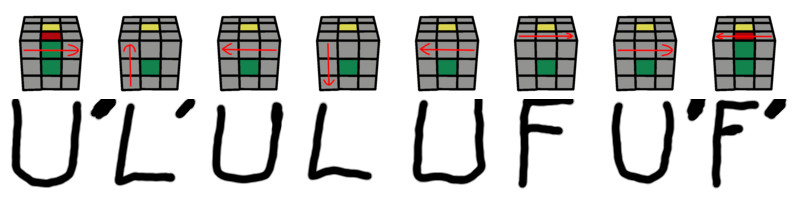
U R U' L' U R' U' L - 3x returns to solved.

RU R'U R 2U R'U - 4x returns to solved.

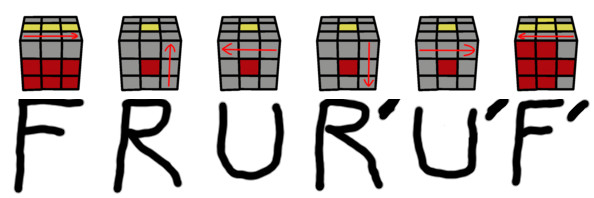
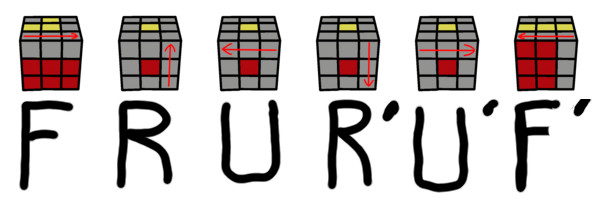
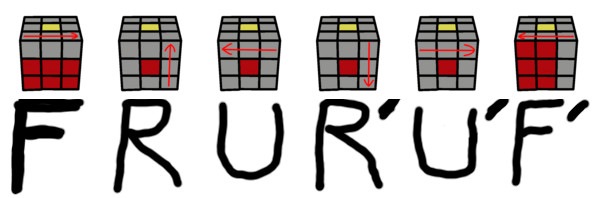
F RU R'U'F' - 6x returns to solved.

UR U'R' U'F' UF - 15x returns to solved.

U'L' UL UF U'F' - 15x returns to solved.

I've listed these algorithms in the order that i think you should study them. They are listed in the reverse-order from when you use them while solving the Cube. I'm calling the algorithm at the top of the list the most important to learn, because if you mess it up while solving the Cube, and you have to go all the way back to the beginning of your solve, you have farther to go. If you're going to fall while climbing the mountain, it is much worse to fall when you are one step from the top, and much better to fall when when you are one step from the bottom.

Also note, the first two algorithms used in your solve, are also the most difficult to practice. Returning the Cube to its solved position takes 15 repetitions of the first two algorithms used in your solve. The other algorithms take 3, 4, or 6 repetitions of the algorithms, to return the Cube to its solved position. If you practice these shorter algorithms first, you'll have a better chance of succeeding with the two algorithms that take 15x.

Contents Home